SMB Protect

Keeping your business online, secure and supported.

Stop cyber issues before they stop your business

What we do
Practical cybersecurity to reduce business risk:
  • Install, configure, and manage SentinelOne EDR (advanced antivirus).
  • Harden Microsoft 365 settings and email filtering for better protection.
  • Set up and monitor Microsoft 365 backups to keep your data safe.
Why it matters
Cyber attacks on small businesses are rising fast.
  • Lower the risk of account compromise with secure Microsoft 365 settings.
  • Stop ransomware and malware using enterprise-grade endpoint protection.
  • Keep your business running with tested backups that prevent costly downtime.
  • Gain peace of mind knowing experts monitor and manage security 24×7.
What you'll see
You won’t notice much—and that’s the point. We keep threats out of sight.
  • No disruption to daily work or tools you rely on.
  • Silent protection running in the background every day.
  • If something happens, we act fast—blocking attacks and restoring data before impact.
  • Clear monthly reports so you know everything is secure without lifting a finger.

Designed for Australian businesses

SMB Protect has been built and optimised with small to medium-sized businesses in mind by delivering the right balance of security features and affordability to help you stay protected, without the complexity of enterprise solutions.

SMB Protect is ideal for:

Small to medium-sized business looking for robust, affordable protection
Start protecting your business and experience AUCyber's enterprise-grade security with SMB Protect.
Teams using Microsoft 365 (Outlook, OneDrive, Teams, SharePoint) for daily operations
Start protecting your business and experience AUCyber's enterprise-grade security with SMB Protect.
Organisations without any dedicated IT or cybersecurity staff
Start protecting your business and experience AUCyber's enterprise-grade security with SMB Protect.

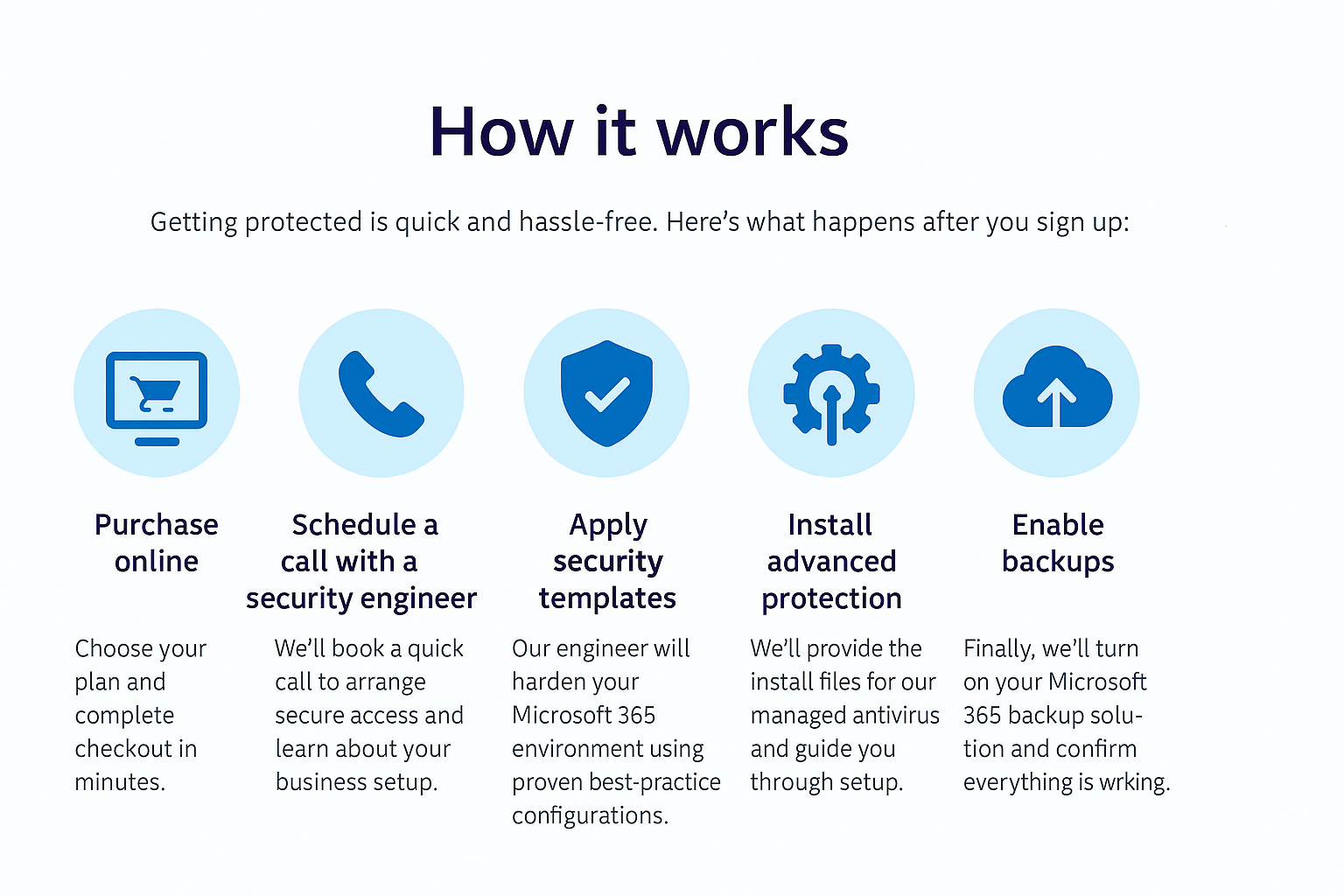
How it works.

jpeg

Start protecting your business today!

Start your cyber protection journey with AUCyber by purchasing one of our early bird bundles below and receive priority onboarding with our dedicated cyber security experts.

SMB Protect 10 image

SMB Protect 10

AU$249.99

Perfect for businesses with up to 10 employees

SMB Protect 20 image

SMB Protect 20

AU$399.99

Perfect for businesses with 10 to 20 employees

SMB Protect 50 image

SMB Protect 50

AU$799.99

Perfect for businesses with 20 to 50 employees

Frequently Asked Questions


1. How quickly can we get started?

Most businesses are fully onboarded within  3 days. After you purchase online, we schedule a call with a security engineer to set up access and begin hardening your environment.


2. Will this disrupt our day-to-day work?

No. Everything runs quietly in the background. Your team keeps working as usual while we secure Microsoft 365, install endpoint protection, and enable backups.


3. Do we need to uninstall our current antivirus?

Not always. If you already have an approved solution, we can integrate it. If not, we’ll provide and manage our advanced antivirus for full protection.


4. What happens if there’s a security incident?

Our team monitors 24×7 and responds immediately. We’ll block threats, isolate affected devices, and restore data from backups—so issues are resolved before they impact your business.


5. Is my data stored in Australia?

Yes. All monitoring and backup services are managed by Australian-based security experts, and data is stored in secure, compliant environments.


6. What does the monthly fee include?

Everything: Microsoft 365 hardening, managed antivirus, backup and restore testing, 24×7 monitoring, and monthly security posture reports. No hidden costs.


7. Can we cancel anytime?

Yes. We offer flexible plans with no long-term lock-in. You can cancel with 30 days’ notice.


8. Do you align with compliance frameworks?

Absolutely. Our configurations and reporting align with the ASD Essential Eight and other Australian security best practices.

Not ready to commit? A quick chat with us can give you clarity.

Fill out the form below and one of our friendly experts will be in touch to walk you through the best options for all your business needs—so you can move forward with total confidence.

Technical Details


Managed Detection & Response (MDR)

  • Coverage: Microsoft 365, endpoints (Windows), and supported applications.
  • Monitoring: 24×7 by AU-based Security Operations Center (SOC).
  • Detection & Response SLA:
    • Critical alerts triaged within 30 minutes.
    • Containment actions initiated within 1 hour (isolation, blocking malicious IPs, disabling compromised accounts).
  • Common Terms:
    • EDR (Endpoint Detection & Response): Advanced antivirus with behavioral analysis.
    • IOC (Indicator of Compromise): Evidence of malicious activity (e.g., suspicious file hash).
    • Playbook: Predefined steps for handling incidents like ransomware or phishing.

Security Operations Center (SOC)

  • Staffing: AU-based analysts, operating 24×7.
  • Alerting: Real-time monitoring of Microsoft 365 and endpoint telemetry.
  • Escalation SLA:
    • High severity: 30 mins email notification.
    • Medium severity: Within 4 hours via ticket and email.
  • Common Terms:
    • SIEM (Security Information & Event Management): Tool that aggregates logs and alerts.
    • False Positive: Benign activity flagged as suspicious—our analysts validate before escalation.

Microsoft 365 Backup

  • Scope: Exchange Online, OneDrive, SharePoint.
  • Frequency: Daily incremental backups; 3x daily snapshots for critical data.
  • Retention: 7 years (configurable).
  • Restore SLA:
    • Single item restore: Within 4 hours.
    • Full mailbox/site restore: Within 24 hours.
  • Common Terms:
    • RPO (Recovery Point Objective): Maximum data loss window—ours is 24 hours or less.
    • RTO (Recovery Time Objective): Time to restore service—ours is under 48 hours for full restores.

General Commitments

  • Onboarding: Typically completed within 5 business days.
  • Reporting: Monthly posture report + incident summaries.
  • Support: AU-based helpdesk during business hours; critical incidents handled 24×7.